
Hi Everyone! I am going to try to remember to start bringing my computer to meetings so that I can program Baofeng radios during meetings with the latest updates, and provide a printout reference to go along with it. If I previously programmed your radio's and want me to upload the latest information and settings tweaks, maybe remind me in the meeting post until I get in to the habit!
If you are interested in programming your own radio's with CHIRP, I will post all the latest files to upload the channels I put on radio's when I program them as well as some other information that might be helpful if creating you own upload files. Hit me up at a meeting or post up here if you have any questions!
Attachments:
"Posse Core Prog File 6-10-25.txt": This is the file to upload all the channel information in to a Boafeng radio. Note that you must change the file extension from .txt to .csv before uploading!
"Posse Print File 6-10-25.pdf": This is a file you can print that is a companion reference for the latest upload file.
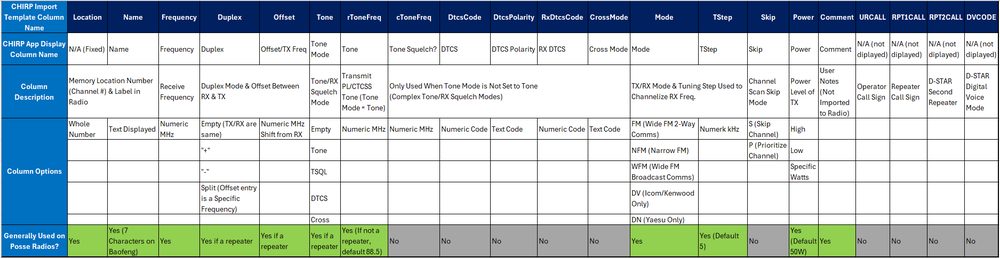
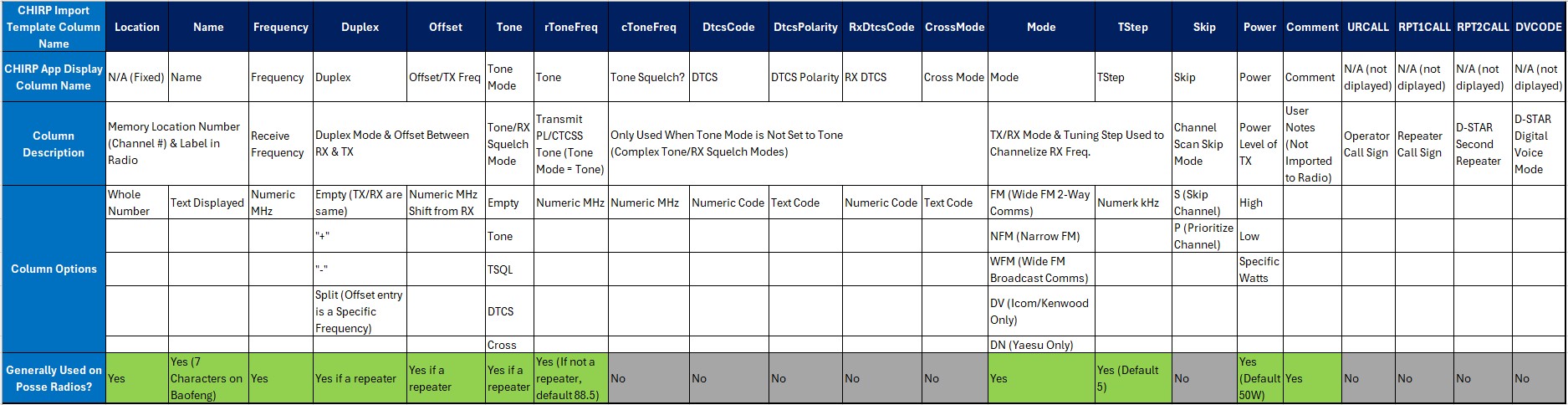
"CHIRP Template Definitions.png": This is an image to reference all possible columns of a CHIRP upload file. Use this to create custom upload files for yourself including other radio manufacturers supported by CHIRP. To get a blank template from CHIRP to start with, click "File > New" then export that new programming file to a CSV by clicking "File > Export to CSV".
Posse-Core-Prog-File-6-10-25.txt